Paced Social Annotation
Help Students Think Before They See What Everyone Else Thinks
Reading has always been the foundation of learning. But in a world where AI can summarize nearly any text in seconds, getting students to engage with a reading before joining the discussion has become increasingly difficult.
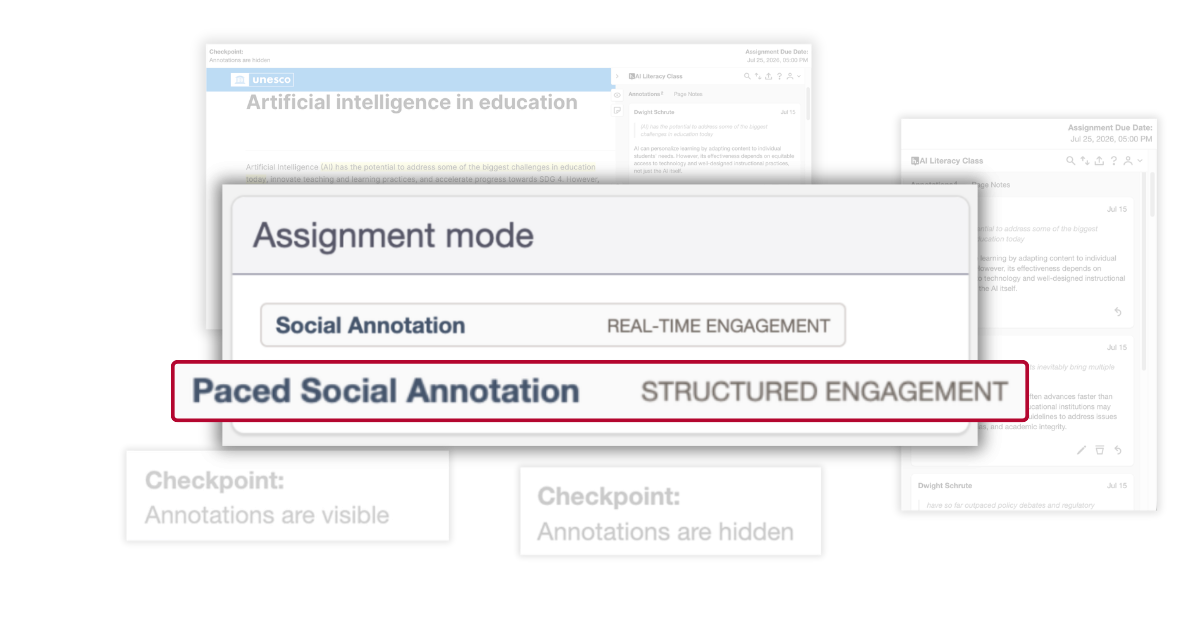
Paced Social Annotation is a new mode in Hypothesis designed to preserve independent thinking. Students complete their own close reading and annotations before seeing what their classmates wrote. Then, at a checkpoint chosen by the instructor, the conversation opens and collaborative learning begins.
Hypothesis now offers two modes of social annotation, Social Annotation and Paced Social Annotation, giving instructors the flexibility to choose the experience that best supports their learning goals.
What Is Paced Social Annotation?
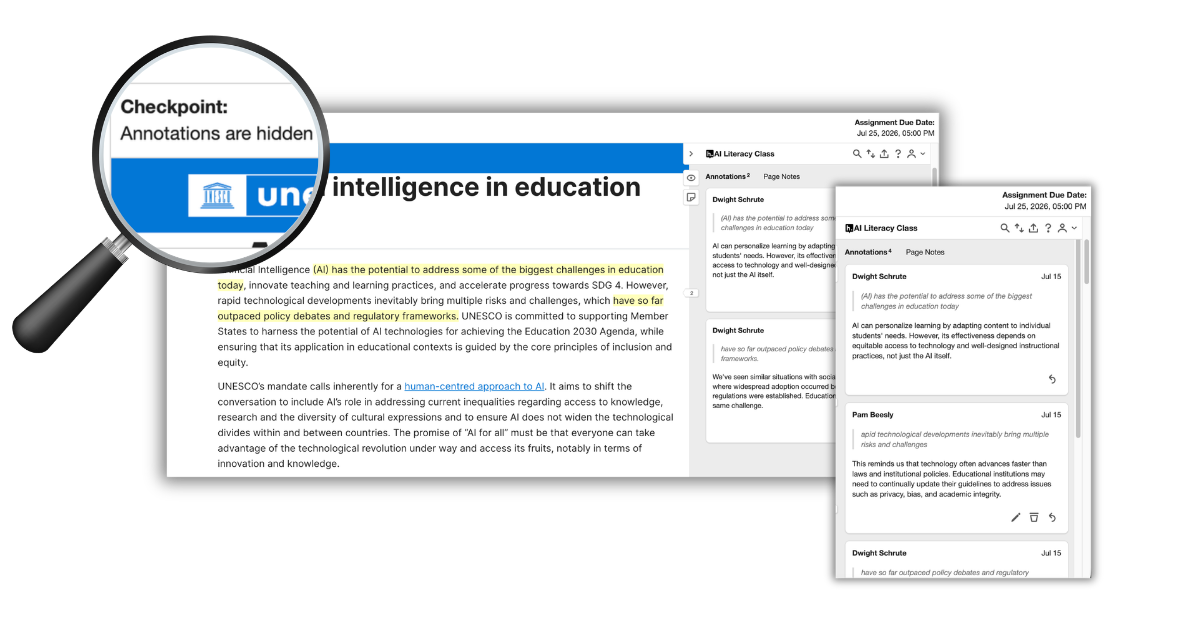
Paced Social Annotation is a mode in Hypothesis that allows instructors to hide student annotations until a checkpoint they choose. Students complete their own close reading and annotations before seeing what their classmates wrote, encouraging independent thinking before collaborative discussion.
Unlike Social Annotation, Hypothesis’s original real-time mode, where students immediately see peer responses, Paced Social Annotation separates reading into two intentional phases: first, students engage independently with the text; then, after the instructor’s checkpoint, they return to compare ideas, ask questions, and build understanding together.
Paced Social Annotation vs. Self-Paced Learning
Paced Social Annotation is not the same as self-paced learning.
Self-paced learning gives students flexibility over when they complete coursework. Paced Social Annotation changes when peer annotations become visible, creating a structured sequence that encourages independent reading before collaborative discussion.
Why We Built Paced Social Annotation
Social annotation has always been about learning together. But as AI tools have become part of everyday academic life, instructors have raised an important question:
How can students develop their own understanding before they’re influenced by classmates, or before using AI?
Paced Social Annotation answers that challenge through instructional design, not surveillance.
Rather than trying to detect AI use or monitor student behavior, it changes the structure of the assignment itself. Students complete an independent reading first, then return later to engage with their peers’ ideas.
The result is a learning experience that supports authentic engagement while preserving everything that makes collaborative annotation valuable.
How Paced Social Annotation Works
Paced Social Annotation is simple for instructors and intuitive for students.
Step 1: Create a Paced Social Annotation assignment.
Step 2: Students complete their reading and add annotations independently.
Step 3: Student annotations remain hidden from classmates while the reading is in progress.
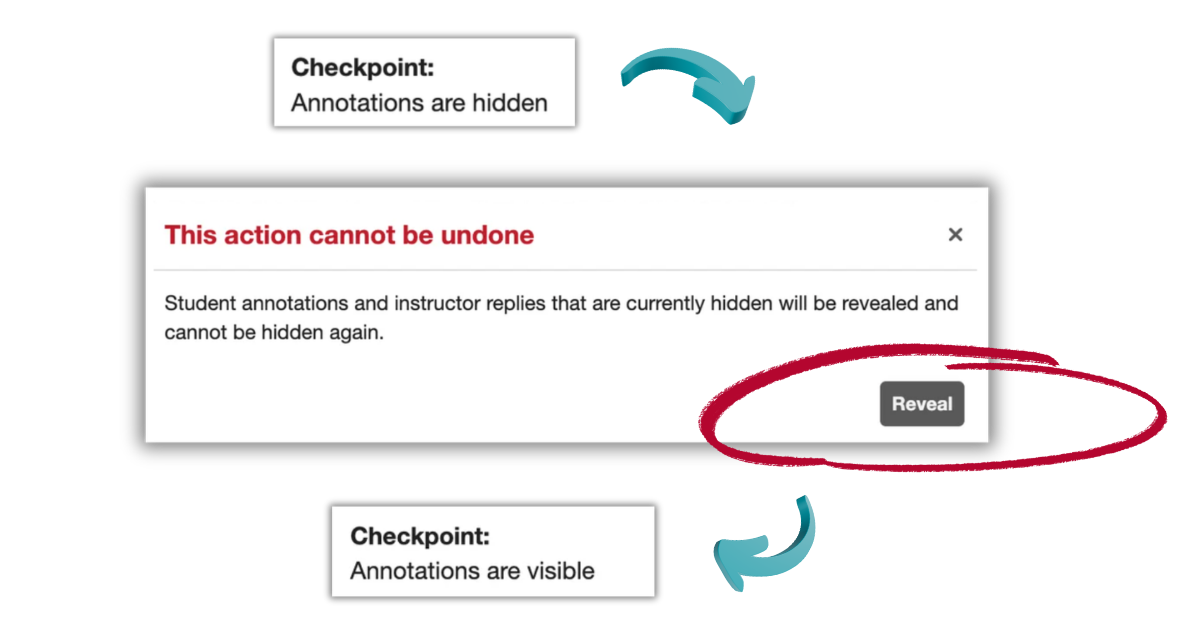
Step 4: At a checkpoint chosen by the instructor, annotations become visible to the class.
Step 5: Students return to compare interpretations, reply to classmates, and continue the discussion together.
See Paced Social Annotation in Acion: Think First, Talk Later
AI has made it easier than ever for students to skim summaries, generated answers, even their classmates’ ideas, before doing any real thinking of their own. Watch Hypothesis CEO Joe Ferraro and Head of Product and Support Michael DiRoberts introduce Paced Social Annotation, a new instructional mode built to help students think independently before joining the conversation.
Why Instructors Choose Paced Social Annotation
Encourage Independent Thinking
Students develop their own interpretations before seeing anyone else’s ideas. This supports close reading, original thinking, and greater confidence in classroom discussions.
Support AI-Resistant Reading
Paced Social Annotation doesn’t detect or monitor AI use. Instead, it encourages authentic engagement by making independent reading the first step of every annotation assignment.
Rather than relying on policy, the assignment itself is designed to promote genuine interaction with the source material.
Create More Meaningful Discussions
When annotations become visible, students return with ideas they’ve already developed on their own.
Instead of repeating what others have already written, discussions become opportunities to compare perspectives, ask questions, and deepen understanding together.
Scale Engagement in Large Classes
Large enrollment courses can quickly become overwhelming when hundreds of annotations appear throughout the week.
Instructor-defined checkpoints create structured moments for discussion, making annotation easier to manage while keeping students engaged throughout the assignment.
Paced Social Annotation also works with our LMS Groups integrations, making sure that you can bring these benefits to small groups in big classes.
Support Scaffolding
Many students benefit from time to think independently before entering a collaborative conversation.
Paced Social Annotation provides that structure naturally, helping students build confidence before engaging with classmates.
Ideal Use Cases
Paced Social Annotation can support a wide variety of teaching approaches, including:

AI-resistant reading assignments

First-year seminars

Large lecture courses

Writing-intensive classes

Humanities and social science discussions

Scientific literature review

Legal case analysis

Primary source interpretation

Graduate seminars

Reading-intensive online courses
Why It Works
Learning doesn’t happen because students simply see information, it happens when they actively engage with it.
Paced Social Annotation encourages multiple interactions with the same text: an initial close reading, independent annotation, and a later collaborative discussion. This sequence promotes reflection before comparison, helping students build stronger understanding while still benefiting from peer learning.
Instead of replacing collaboration, Paced Social Annotation strengthens it by giving every student the opportunity to contribute original ideas before the conversation begins.
Ready to Try Paced Social Annotation?
Give every student the opportunity to think independently before learning together.
Whether you’re teaching a seminar of twenty students or a lecture course with hundreds of learners, Paced Social Annotation helps transform reading into a more thoughtful, engaging, and collaborative experience.
Paced Social Annotation is now available for all LMS partner institutions. If you’re interested in using the LMS app in your course, please contact us at success@hypothes.is.
For step-by-step setup instructions, visit our Knowledge Base article on Paced Social Annotation.
Paced Social Annotation is a mode in Hypothesis that lets instructors hide student annotations until a checkpoint they choose, rather than displaying them as soon as they’re posted. Students complete their own close reading and annotation first, working through the text without seeing what classmates have written. Once the instructor opens the checkpoint, for example, after a reading deadline or at the start of the next class session, all annotations become visible and students return to compare interpretations and respond to each other. It’s designed for instructors who want the collaborative benefits of social annotation without students anchoring their thinking to the first few comments that appear.
More info: Early Release Info – Paced Social Annotation
Social Annotation, the original Hypothesis mode, shows student annotations to the class as soon as they’re posted, so students reading later in the week can already see what their classmates noticed. Paced Social Annotation changes that sequencing: annotations stay hidden from other students until the instructor manually opens them at a checkpoint. For example, an instructor might assign a reading due Monday night, keep all annotations hidden through the deadline, then open them Tuesday morning before class discussion. Social Annotation works well for ongoing, seminar-style dialogue, while Paced is built for assignments where independent thinking before comparison matters more.
Self-paced learning refers to giving students flexibility over when they complete their coursework, for example, allowing a student to finish a reading anytime within a two-week window instead of by a fixed date. Paced Social Annotation is unrelated to that kind of scheduling flexibility. It controls when annotations become visible to classmates, not when students are allowed to do the work itself. An instructor can run Paced Social Annotation on a strict, fixed-deadline assignment (due Friday at 11:59pm, annotations open Saturday morning) just as easily as on a more flexible one. The “paced” in the name refers to the pacing of the discussion reveal, not the pacing of the coursework deadline.
No, Paced Social Annotation is not an AI detection tool, and it doesn’t scan, flag, or monitor student writing for AI-generated content. Instead, it addresses the same underlying problem, students skipping the reading and leaning on classmates’ annotations or an AI summary, through assignment design rather than surveillance. By hiding annotations until a checkpoint, it removes the shortcut of scrolling to a classmate’s comment instead of doing the reading. For example, a student can no longer open the assignment, see three peers have already annotated the difficult passage, and simply agree with their take instead of forming an original one. This approach sidesteps the arms race of AI detection software entirely by changing what’s possible within the assignment itself.
Yes, and large enrollment courses are actually one of the strongest use cases for Paced Social Annotation. In a Social Annotation assignment with 200 students, annotations can pile up so quickly that any individual student’s contribution gets buried, and the sheer volume can be overwhelming to read through. Paced Social Annotation’s instructor-set checkpoints break that volume into a single, structured moment where all annotations open at once, making the resulting discussion much easier to navigate. Instructors in large lecture courses have used this to create a clear “reveal” moment that anchors a follow-up discussion, rather than an unstructured, ever-growing thread.
Paced Social Annotation is a new mode within Hypothesis, not a separate product or a new purchase. It sits alongside Social Annotation, the mode Hypothesis has always offered, as a second way to run an annotation assignment. If you’re an existing Hypothesis customer, it’s included in your current plan automatically, there’s no upgrade path, additional license, or separate sign-up required. Instructors simply choose which mode to use when they create an assignment.
No. Social Annotation, the original real-time mode, continues to work exactly as it always has, students see annotations as soon as they’re posted, and nothing changes for instructors who prefer that experience. Paced Social Annotation is an additional option, not a replacement, so both modes exist side by side and instructors choose per assignment which one fits the reading. A single course could use Social Annotation for informal, ongoing discussions and Paced Social Annotation for a more structured close-reading assignment.
No. Paced Social Annotation is included as part of your current Hypothesis plan at no additional cost. There’s no separate fee, tier, or add-on required, if your institution already has Hypothesis, your instructors already have access to both modes.
Not at this time. Mode is set when an assignment is created, so switching from Social Annotation to Paced Social Annotation requires creating a new assignment rather than converting an existing one. This is worth planning for at the start of a course or unit, if you know you want Paced mode for a particular reading, set that up as its own assignment from the beginning rather than an existing Social Annotation assignment you’d need to change later.
Yes, but with an important distinction between top-level annotations and replies. Instructor top-level annotations, meaning ones made directly on the text rather than as a reply, are visible to all students in the Hypothesis group right away. Instructor replies to a specific student’s annotation, however, are only visible to that student until the checkpoint, once revealed, the same instructor reply becomes visible to the whole class along with the rest of the discussion. In practice, this means an instructor can add general commentary to the text that everyone sees immediately, while feedback on an individual student’s thinking stays private between the instructor and that student until the reveal.
No, revealing annotations at a checkpoint is optional, not required. If an instructor prefers to keep an assignment fully private, they can leave it unrevealed indefinitely, in which case student annotations stay visible only to the student who wrote them and the instructor, similar to how 1:1 mode works. This gives instructors the flexibility to use Paced Social Annotation purely as a private reading-check tool for some assignments, while still revealing others to spark class discussion, the choice is entirely up to the instructor on an assignment-by-assignment basis.