This guide is for schools without specific data residency requirements. For compliance with Canadian data residency requirements please see the Canadian version of this guide.
To enable advanced Hypothesis integration with Canvas, a Canvas administrator will need to generate a Canvas API Developer Key before Hypothesis is installed.
This key will be tied to the Hypothesis LTI tool, and enables the following deeper integrations with Canvas:
- Access to Canvas Files for documents
- Integration with Canvas Groups
- Integration with Canvas Sections
For more detail, please see our article on the Canvas API endpoints used by the Hypothesis LMS app.
Note that deleting the API Developer Key and/or creating a new API Developer Key for Hypothesis will require installing a new instance of Hypothesis in Canvas.
1. Create a new Canvas Developer Key for Hypothesis
Navigate to Admin > Developer Keys, click on the +Developer Key button, and select the +API Key option.

2. Fill out the Key Settings form
- Key Name:
Hypothesis
- Owner Email:
- Enter an appropriate email address
- Redirect URIs (make sure there are no extra spaces or characters copied and pasted here):
-
https://lms.hypothes.is/canvas_oauth_callback
https://lms.hypothes.is/module_item_launch_oauth_callback
-
- Redirect URI (Legacy):
- leave blank
- Vendor Code (LTI 2):
- leave blank
- Icon URL:
https://d242fdlp0qlcia.cloudfront.net/uploads/brand/HypothesisCanvasIcon.png
If your institution enforces scopes on the Developer Keys, see below for the list of API endpoints to enable.
Click the Save Key button in the lower right corner to finish.
3. (Optional) If your institution enforces Scopes on Developer Keys, configure the following:
- Click the switch to Enforce Scopes and check the box to select Allow include parameters.

- Enable the following 9 API endpoints (organized by category):
- Courses
url:GET|/api/v1/courses/:idurl:GET|/api/v1/courses/:course_id/users/:id
- Files
url:GET|/api/v1/courses/:course_id/filesurl:GET|/api/v1/courses/:course_id/foldersurl:GET|/api/v1/files/:id/public_url
- Group Categories
url:GET|/api/v1/courses/:course_id/group_categoriesurl:GET|/api/v1/group_categories/:group_category_id/groups
- Groups
url:GET|/api/v1/courses/:course_id/groups
- Sections
url:GET|/api/v1/courses/:course_id/sections
- Pages
url:GET|/api/v1/courses/:course_id/pagesurl:GET|/api/v1/courses/:course_id/pages/:url_or_id
- Courses
- Click the Save button in the lower right corner to finish.
4. Make note of the Hypothesis API Developer Key secret
As soon as you click the Save button, a dialog box will appear displaying the secret for the API Developer Key. This value corresponds to the API Developer Key Secret field in our form, which you will later submit to Hypothesis.
Be sure to copy and save this value in a temporary note or text file before proceeding. Once you have copied the secret, click Close.

5. Locate the new Hypothesis API Developer Key in the list and click the “On” button to enable.
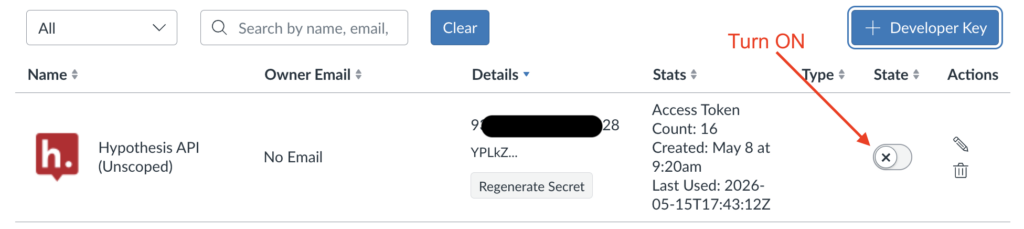
The ID (shown in the Details column) will correspond to your Canvas Developer ID.